Async coordinates waiting without promising parallel CPU work
An async method can suspend at an incomplete await and resume after the awaited operation completes. Its returned Task represents the eventual completion and, for Task of decimal here, the eventual decimal result. Calling an async method does not automatically put every line on another thread. It begins executing normally until it reaches a suspension point. This distinction is especially useful in a browser runtime, where a desktop thread-pool mental model can lead to incorrect expectations.
LoadPriceAsync in this lesson does not contact a price server. It awaits a short Task.Delay and then returns the prepared price argument. The id parameter is present but is not used in the calculation. Treat the delay as a controlled stand-in for waiting, not proof of networking or a benchmark. Starting both calls before awaiting their combined completion lets their waiting periods overlap without requiring a claim about simultaneous processor execution.
 View full size ↗
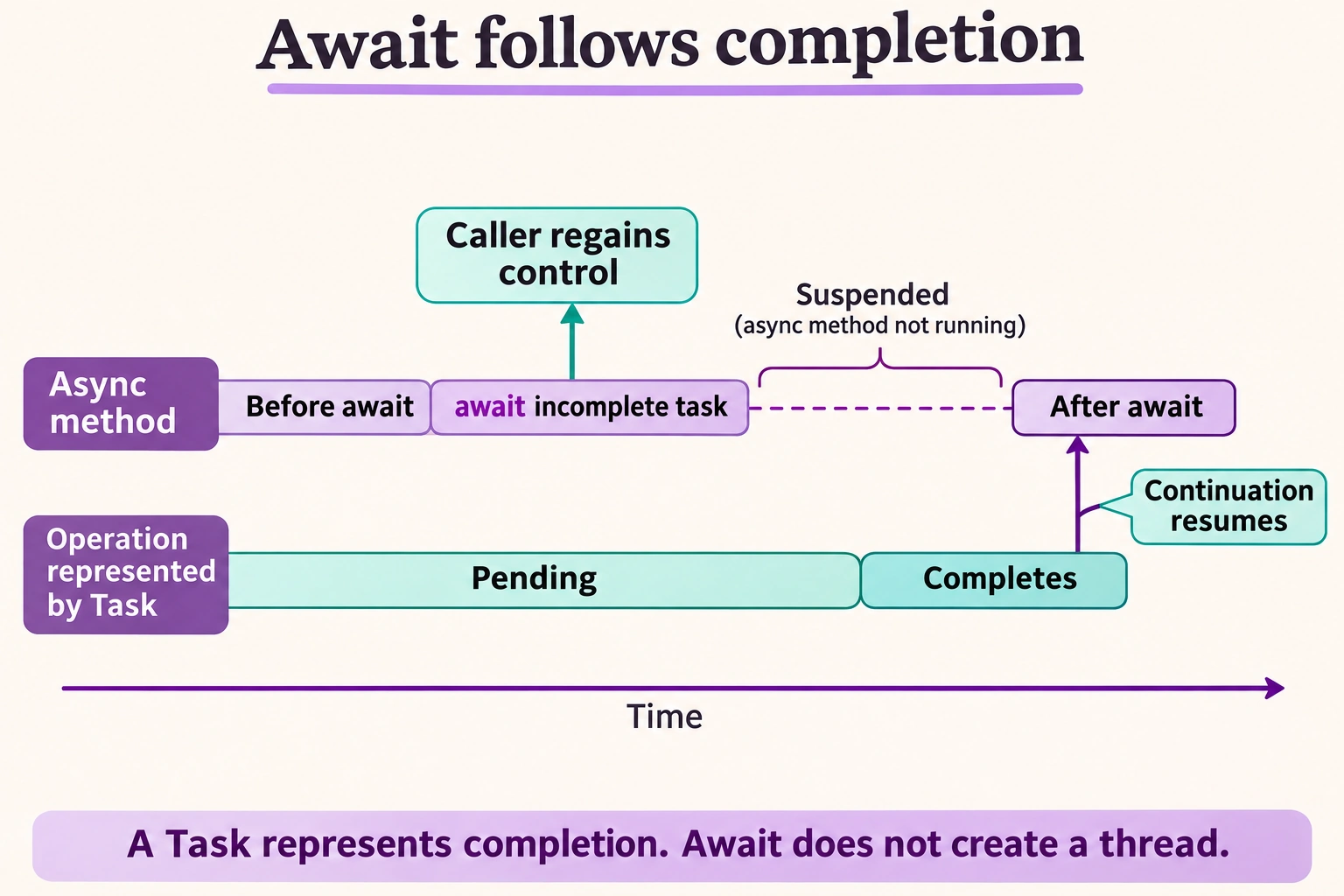
Read the diagram
Call an async operation to obtain a task. The task represents its eventual completion; it is not itself a thread.
If the task is incomplete when awaited, the method suspends and returns control to its caller. The caller can await that method too. The executing thread is not blocked by this await.
When the operation completes, the method continues after await and observes the result or exception. If the task was already complete, await can continue synchronously.
Await does not automatically start a new thread, and an async method executes synchronously until it reaches an incomplete await. This is a control-flow diagram, not a promise about thread placement.
Illustration created with ImageGen for SharpRune.
Start two operations, then retain their input order
The first call begins with the prepared amount 12.50 and returns a pending task when its delay suspends. The second call begins with 4.25 in the same way. Both task references exist before Task.WhenAll is awaited. WhenAll completes successfully after both inputs complete and provides a result array corresponding to the order of tasks supplied: first's result remains first, even if the second operation happens to finish earlier. Completion timing does not reorder the price array.
The first WriteLine joins those decimals with a space-plus-space separator and prints 12.50 + 4.25 in this invariant browser environment. The next sums the two prices and prints 16.75. No line is printed from inside LoadPriceAsync. The exact wall-clock duration is not part of the expected output: a requested delay can complete later because scheduling and runtime activity affect when continuations execute. The arithmetic and result order are deterministic even though precise timing is not.
var first = LoadPriceAsync("a", 12.50m);
var second = LoadPriceAsync("b", 4.25m);
var prices = await Task.WhenAll(first, second);
Await the operation instead of blocking on it
Replacing await with Result or Wait introduces synchronous blocking and can be inappropriate or unsupported in browser execution. Keep the async path async rather than using blocking as a shortcut. Also note that WhenAll does not cancel remaining tasks automatically when one fails; its completion represents all supplied operations. Error and cancellation handling are additional contracts, not behavior demonstrated by these always-successful delays. Avoid measuring the example as exactly twenty milliseconds or describing it as two guaranteed CPU threads.
Change completion order without changing result order
First make the two calls use different delays, such as forty milliseconds for the first operation and one for the second. Retain the order of task arguments passed to WhenAll. Predict the same two output lines despite the likely completion-order difference. Hint: return a task-specific delay argument or derive it explicitly from the prepared id, and distinguish input order from the order in which diagnostic completion messages might appear.
Next add a third operation returning 2m and pass its task last. Predict a joined third value followed by a sum of 18.75. Then compare with a version that awaits each call before starting the next. Hint: both formulations can produce the same prices, but their waiting relationships differ. Describe that relationship without asserting an exact duration. Finally explain where a cancellation token would need to enter a real supported I/O operation rather than imagining that the await keyword accepts one by itself.
Identify tasks, results, and scheduling claims separately
Explain which variables contain pending operations and which contain decimal values. Trace when each operation starts and where the caller waits for both. The unchanged lesson's two lines prove the selected result order and arithmetic, while they do not prove a network request, a thread count, or exact timing. A well-designed async test uses controlled outcomes and explicit boundaries instead of treating a short delay as a precise clock.
- Both calls start before the combined await.
- Task.WhenAll preserves the supplied task order in its results.
- The original sum is
16.75. - Async waiting is not a guarantee of parallel CPU execution.
A working example
async Task<decimal> LoadPriceAsync(string id, decimal price)
{
    await Task.Delay(20);
    return price;
}

var first = LoadPriceAsync("a", 12.50m);
var second = LoadPriceAsync("b", 4.25m);
var prices = await Task.WhenAll(first, second);

Console.WriteLine(string.Join(" + ", prices));
Console.WriteLine(prices.Sum());Expected output
12.50 + 4.25
16.75
Start the tasks first, then await them together.