Learn with working examples
Browse 20 courses and 519 lessons. Read the explanation, predict the output and open a copy in Code. Your own project stays separate from the original lesson.
Read a lesson, change the sample and follow an idea into a project of your own. SharpRune brings a native editor, a learning library and a real C# compiler to iPhone and iPad.
For iPhone and iPad running iOS 18 or later. The compiler and bundled curriculum live on the device. Keep local projects and export the work you want to take elsewhere.
Planned public app launch: US$9.99 one-time. Current TestFlight preview: free by invitation.
var prices = new[] { 12m, 8m, 25m };

var total = prices
    .Where(price => price >= 10m)
    .Sum();

Console.WriteLine(total);Learning and making belong close together. Each part helps you take a concrete next step.
Browse 20 courses and 519 lessons. Read the explanation, predict the output and open a copy in Code. Your own project stays separate from the original lesson.
Keep related C# files together, organize them into folders and search your source. Reference examples give you complete small projects to understand and adapt.
Roslyn compiles your source and .NET 9 WebAssembly executes it locally. Read compiler diagnostics, supply prepared input and compare the actual result with your prediction.
Pause before a statement runs. See the values it will use, follow a call and connect each change to the line that caused it.
Start debugging pauses before the first executable statement. Tap a line number to set a breakpoint; a blank or comment line binds to the next executable line in that file when one is available.
Continue runs until the next breakpoint or completion. Pause requests a stop at the next instrumented statement. Stop ends the debug session.
Step Into follows a call into your project's C# source. Step Over executes the current statement without entering its calls. Step Out resumes until control returns to the caller.
Choose a call-stack frame to see its available locals and navigate to that frame's source. The live execution location remains highlighted while you inspect.
Inspect assigned locals and parameters, class instance fields through this, and expandable field and array values. The inspector reads fields without evaluating user property getters or custom ToString methods.
Values describe the paused program. Keep following the statements to see how a value changes; arbitrary watch-expression evaluation is not part of this preview.
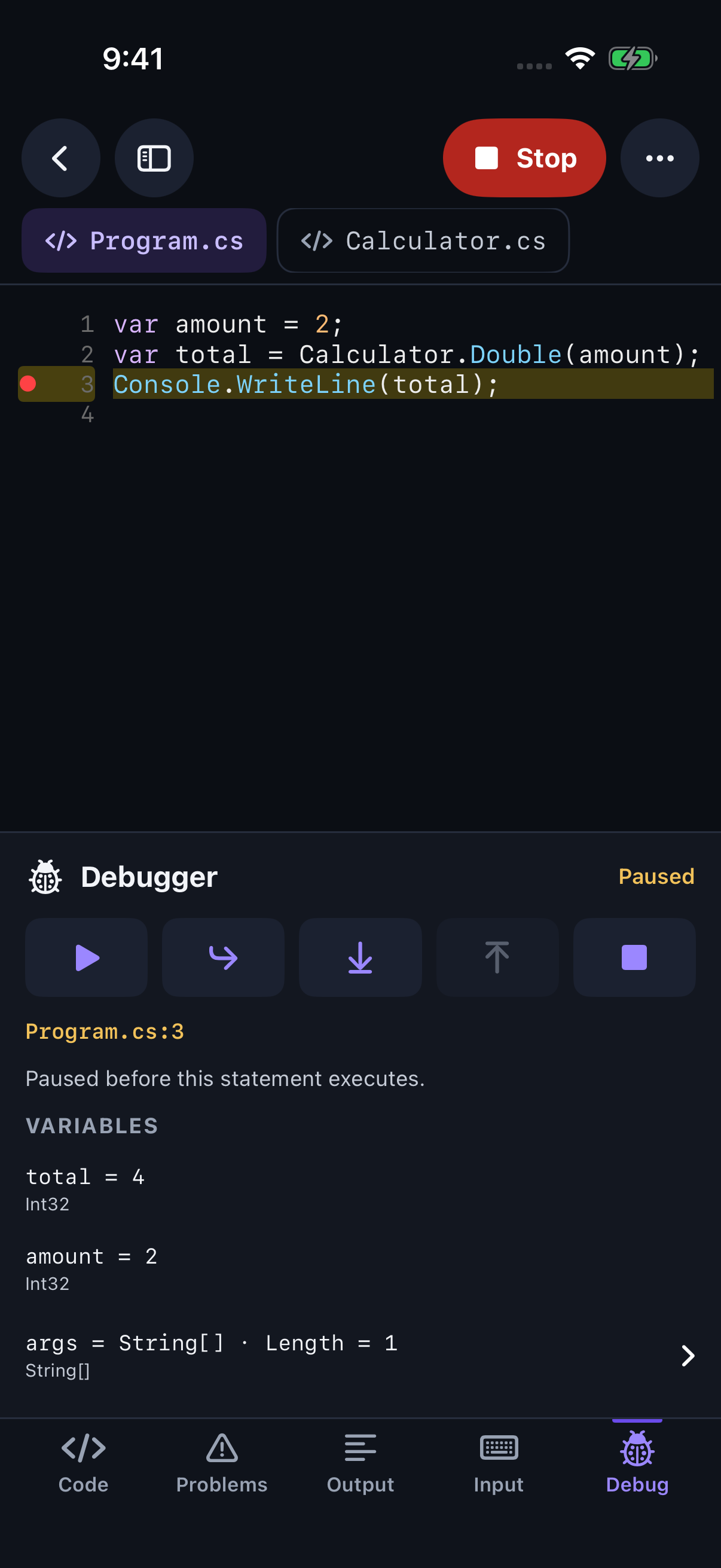
Program.cs:3 with total = 4 and amount = 2. Select the image to view it at full size.For native C# console projects. Framework and package internals, expression lambdas and iterator bodies run as opaque calls. Ref-like values are omitted from the inspector. Stop debugging before editing; this preview has no hot reload. The browser playground keeps Run and compiler diagnostics; it does not have stepping controls. Server and JavaScript debugging are outside this feature.
The app and website share the learning material. Their project storage and progress remain independent.
| Capability | iPhone & iPad app | Website & playground |
|---|---|---|
| Appearance | Light, Dark or Auto in Settings → Appearance | Light, Dark or Auto from the page header; saved in this browser |
| The .NET journal | Eight complete articles and illustrations bundled for offline reading | Eight free articles, with three downloadable .NET 10 experiments |
| Where you use it | Native app on iPhone and iPad, iOS 18 or later | A recent desktop or mobile browser with WebAssembly |
| Lessons and references | Bundled learning material works offline | Public reading pages; internet access is needed to load them |
| Running C# | Roslyn and .NET 9 WebAssembly run on the device | Roslyn and .NET 9 WebAssembly run in a browser worker |
| Source debugging | Native TestFlight preview: breakpoints, stepping, locals and call stack | Run and compiler diagnostics; no source stepping |
| Project storage | Local projects, folders and multiple source files | Temporary editor session; download all source as a ZIP |
| Learning progress | Saved in the app on this device | Saved in this browser; it does not sync with the app |
| Prepared input | Supply Console.ReadLine() values before a run | Supply Console.ReadLine() values before a run |
| Sharing | Optional temporary encrypted rooms and project export | Open a shared-room snapshot or download a local project |
| Access | Free TestFlight preview by invitation; planned public launch US$9.99 one-time | Free to use without an account |
Explore language features, collections, algorithms, async workflows and managed data processing. Multi-file examples show how small programs can grow into understandable projects.
The app uses a .NET 9 WebAssembly runtime with bundled references. Operating-system processes, arbitrary native libraries and production ASP.NET server deployment require a separate environment.
A run has a 120-second limit. Prepare input before running; the input panel is not an interactive terminal. Keep an exported copy of important work.
Read the field guide ↗The planned public App Store launch price is US$9.99 as a one-time app purchase. The public website and current invitation-only TestFlight preview are free. No purchase, subscription or pre-order is available on this website. Regional App Store pricing will be shown before a future purchase; beta access does not grant a future paid-app entitlement.
An ordinary Run compiles and executes the code locally: on the device in the native app, or in a WebAssembly worker in the browser playground. Optional room sharing and network calls written into your own code are separate network activity.
Email support@sharprune.com. Native preview users can also choose Send Beta Feedback in TestFlight. Include your app build or page URL, device, steps and expected behavior, and remove credentials and private source.
Source stepping is a native C# console debugger feature. It pauses at entry, supports source breakpoints and provides Continue, Pause, Stop, Step Into, Step Over and Step Out. The browser playground provides local Run and compiler diagnostics, without stepping controls.
No setup. No account. Just a little curiosity.