Serialization is a contract between values and text
JSON represents data as text with a defined grammar for objects, arrays, strings, numbers, booleans, and null. Serialization converts a model value into that representation; deserialization constructs a model from compatible text. The text is not the original object stored in another variable. Keeping that distinction clear helps you reason about copying, equality, validation, and the compatibility of files exchanged between different versions of an application.
This project already contains a sealed positional Order record in Models/Order.cs, with Id, Amount, and IsPaid properties. The configured camel-case naming policy maps their JSON names to id, amount, and isPaid. That is a deliberate wire-format choice, not a change to the C# property names. The same options are passed when reading the text back, so both directions agree on the mapping. Preserve the model file instead of declaring an unrelated second Order in the entry file.
 View full size ↗
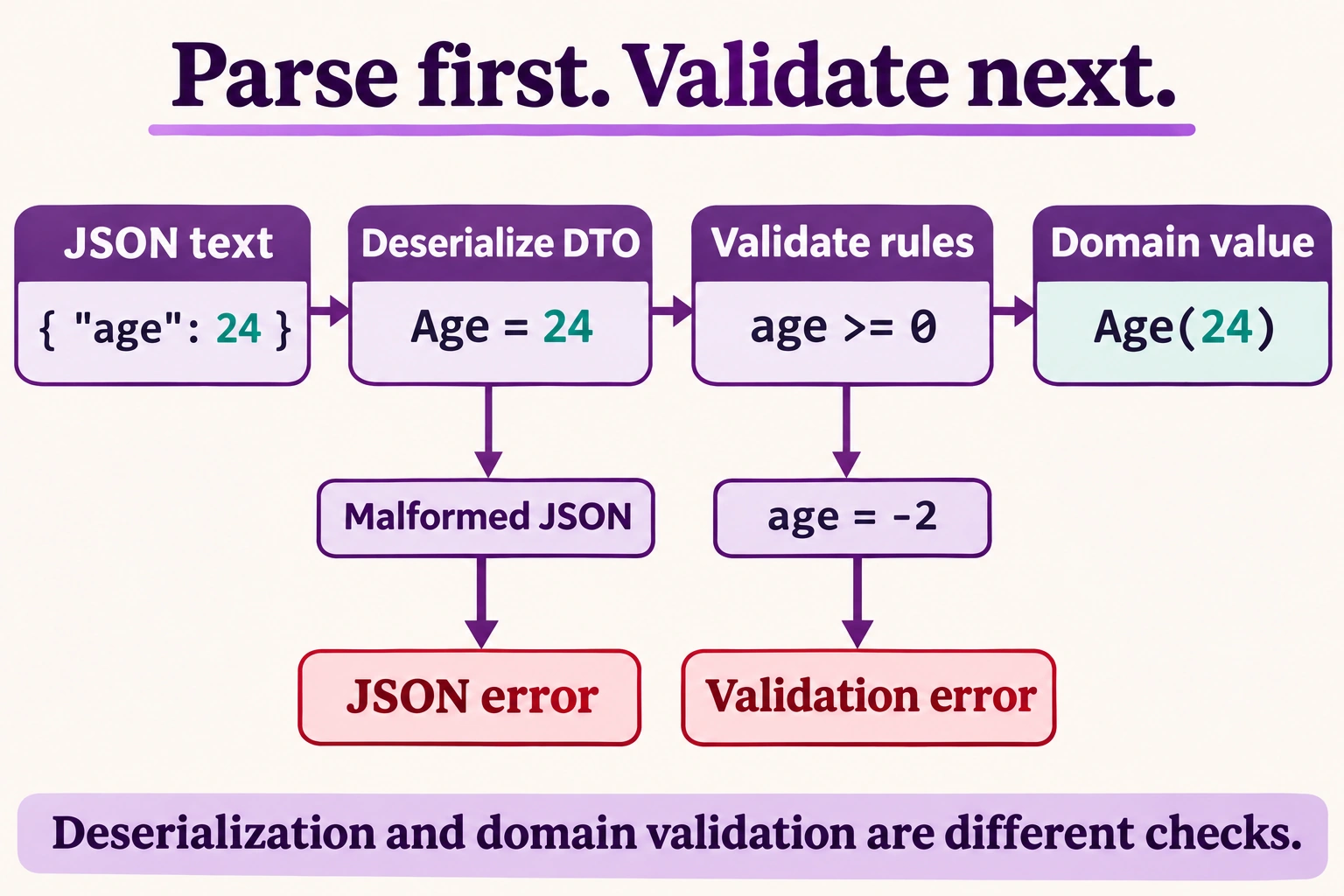
Read the diagram
The diagram begins with JSON text containing age = 24. Deserialization maps it to a DTO with Age = 24. Map the JSON property name age explicitly, for example with JsonPropertyName, or configure an appropriate naming policy; the default serializer is case-sensitive.
The application then checks its rule age >= 0. The value 24 passes and can become the domain value Age(24). This is a separate conceptual example from the runnable lesson.
Malformed JSON is rejected at the deserialization boundary. A value such as age = -2 can be a valid JSON integer and deserialize successfully, but it fails this domain rule and produces a validation error instead.
Deserialization and domain validation are separate boundaries. Missing JSON properties can become default DTO values, depending on the contract. Define required values, allowed ranges and relationships explicitly; the serializer does not automatically enforce business rules.
Illustration created with ImageGen for SharpRune.
Read both output lines as different kinds of evidence
The original order contains identifier a1, decimal amount 12.50, and paid status true. Serialize produces the observed JSON text {"id":"a1","amount":12.50,"isPaid":true}. Its property names are strings, its amount is a JSON number rather than a quoted price string, and its status is the JSON boolean true. The decimal scale is retained in this observed output. JSON's own number syntax uses a period independently of a human user's regional number format.
Deserialize reads that text into another Order value. The following comparison prints True because record equality compares the declared values for this model, not whether both variables point at one object instance. The program has therefore observed a successful value round trip. That does not prove every conceivable input document is valid or that JSON object property order has semantic meaning. The displayed order is the serializer's output for this model; readers should select properties by name rather than rely on their textual position.
var json = JsonSerializer.Serialize(order, options);
Console.WriteLine(json);

var back = JsonSerializer.Deserialize<Order>(json, options);
Console.WriteLine(back == order);
Parsing success does not establish every domain rule
A naming policy is not a universal case-insensitive reader. Case-insensitive property matching is a separate serializer option. Likewise, omitted fields, extra fields, null input, and out-of-range amounts need an intentional contract rather than an assumption that a round trip covers them. A well-formed document can still contain an unacceptable negative price. Validate business rules after reading and decide which fields are required. Do not treat serialization as encryption or automatically export every future public property without reviewing the data contract.
Change a value, then change the naming policy
First change the amount to 4.25m while leaving the identifier and status unchanged. Predict JSON containing amount 4.25 followed by True after the round trip. Hint: the equality check compares the newly prepared order with its own deserialized version, not with the original lesson's twelve-fifty order. Then change isPaid to false and verify that the JSON boolean and restored value both change consistently without becoming a string such as "false".
Next remove the camel-case naming policy from both operations in a controlled copy of the project. Predict property names Id, Amount, and IsPaid in the serialized text while the value round trip still succeeds. Hint: use matching options in both directions before experimenting with mismatched contracts. Finally prepare a document missing amount and investigate the restored value, then add explicit validation so a missing required amount cannot silently enter a workflow as an acceptable default.
Test the wire shape and restored values separately
Identify which output line demonstrates the textual contract and which demonstrates value equality. Keep the original two-line expectation beside the prepared Order fields and the model file. A useful serializer test checks names and value kinds as well as the restored data, then adds malformed and semantically invalid documents as separate cases. This makes a future model refactor reviewable instead of assuming that any program able to emit JSON has preserved compatibility.
- The model comes from the existing Models/Order.cs file.
- Camel-case names affect the JSON contract, not C# member names.
- The original second output line is
True. - A valid round trip does not validate arbitrary external documents.
A working example
using System.Text.Json;

var options = new JsonSerializerOptions { PropertyNamingPolicy = JsonNamingPolicy.CamelCase };
var order = new Order("a1", 12.50m, true);

var json = JsonSerializer.Serialize(order, options);
Console.WriteLine(json);

var back = JsonSerializer.Deserialize<Order>(json, options);
Console.WriteLine(back == order);Expected output
{"id":"a1","amount":12.50,"isPaid":true}
True
Use the same options for writing and reading.