The Unity script needs the Editor and the setup listed below. The separate C# companion practice runs in SharpRune without UnityEngine.
Initialization and activation are different lifetimes
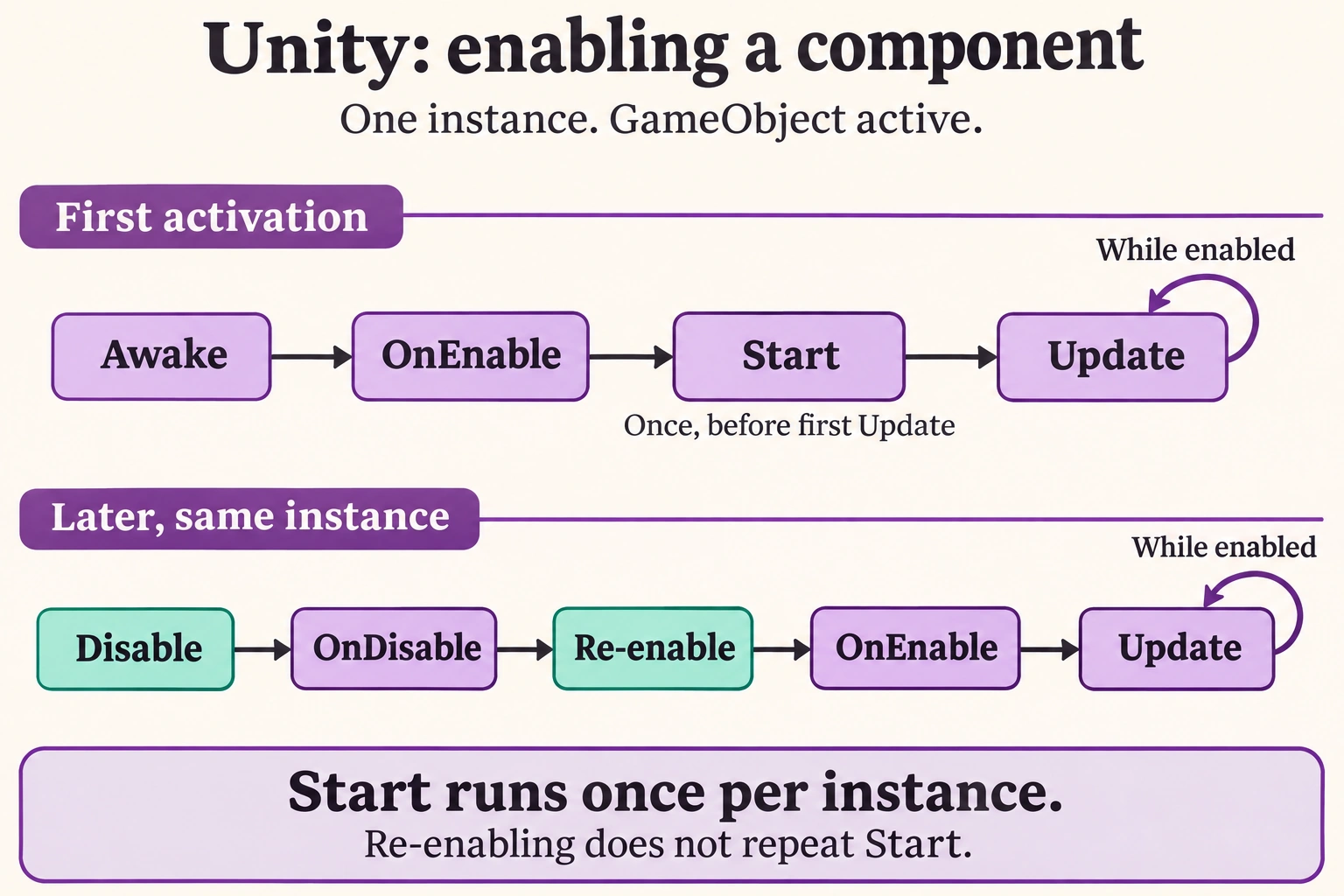
Awake, OnEnable, Start and OnDisable should not be treated as interchangeable places to put setup. For one initially active enabled MonoBehaviour, Awake prepares instance state, OnEnable begins its enabled lifetime, and Start runs once before ordinary frame work. Later enable transitions can repeat the activation callbacks without reconstructing the instance or rerunning Start. A lifecycle diagram is useful only when its scope is explicit: one component’s documented relationships do not establish an arbitrary order among every instance across the whole scene.
 View full size ↗
Read the diagram
The first row shows a typical initially enabled MonoBehaviour on an active GameObject: Awake, OnEnable, then Start before its first Update. Update continues while the component is enabled and its GameObject is active.
The second row starts after that instance has already started. Disabling it calls OnDisable. Re-enabling the same instance calls OnEnable again, then Update can resume. Start does not repeat for that same instance.
This diagram describes one component, not a global ordering between different objects. It does not specify physics callbacks or guarantee that an initially inactive or never-enabled object has already run these callbacks.
Destroying an instance and creating a different instance is a new lifetime. The portable C# companion practice in this lesson explores state transitions; Unity itself invokes the real engine callbacks shown here.
Illustration created with ImageGen for SharpRune.
Trace one instance before adding cross-object dependencies
Attach LifecycleProbe.cs to an active object named Lifecycle and enter Play mode. Its initial intended trace is Awake, OnEnable and Start for that instance. Unchecking the component’s enabled box then checking it again produces OnDisable and OnEnable without another Start. Deactivating the GameObject is a separate experiment. An initially inactive scene object delays its initialization path until activation; an active object with a disabled component is not the same setup. Record names and callback labels so messages from different instances cannot be confused.
The activation ledger tests bookkeeping, not engine scheduling
The portable ActivationSession is an ordinary C# state machine with explicit Activate and Deactivate calls. Its first activation records initialization, first start and one activation. Deactivation clears active state, and a second activation increments only the activation counter. The output is initialized:1, started:1 and activations:2. Those counts explain a useful once-versus-repeat distinction, but they do not prove Unity invoked a callback. The actual engine trace must come from the separate component in an Editor scene with the specified object states.
Do not rely on another object’s Awake inside your OnEnable
For the same instance, the relevant initialization relationship is documented. Across unrelated objects, an observed order can differ with loading, instantiation or project configuration. OnEnable on one instance should not casually assume every other instance has already completed Awake. References required by OnEnable should be acquired safely in Awake or supplied through an explicit initialization design. Subscribe/unsubscribe work often belongs to the activation lifetime, while durable per-instance caches can belong to initialization. A script execution order setting is not a replacement for understanding the dependency being imposed.
Practice: compare three activation setups
Run three independent cases: initially active and enabled, active with the component initially disabled, and an initially inactive GameObject. Enable or activate the delayed cases during Play and record which callbacks appear. Then toggle the already-started component several times. Predict which callbacks repeat and which remain once-per-instance. Use one object per initial experiment so its trace stays readable, and only afterward introduce a second object to observe why cross-instance timing should not be inferred from the first successful run.
- Keep instance name and callback name together in every log.
- Use OnEnable for per-activation work only when its matching OnDisable policy is equally clear.
Practice: make repeated calls idempotent where intended
For an independent portable change, call Activate twice without an intervening Deactivate and verify that the active guard prevents an extra activation count. Then create a fresh ActivationSession and show that its own counters begin independently. Add a subscription-like counter owned by activation and verify that a complete activate/deactivate cycle returns it to zero. The exercise concerns your model’s explicit rules, not a claim that Unity suppresses every duplicate custom method call or that an ordinary class is a hidden MonoBehaviour implementation.
- Write expected counters before each sequence of calls.
- Treat destruction, scene unloading and static-session reset as additional lifetimes rather than aliases for one enable transition.
Assign each responsibility to one named boundary
A lifecycle design is easier to test when it states what happens once, what happens on each activation and what must be undone. The real probe exposes those boundaries without relying on a global manager or custom execution-order override. Verify its callbacks in a Unity 6 Editor scene using the setup below, then repeat the relevant transitions in your target Player. When extending it to pooled actors, input actions or event listeners, preserve the same ownership reasoning and verify actual scene transitions instead of assuming the first startup trace covers every later lifetime.
- The initial active instance reports Awake, OnEnable and Start.
- A later disable/enable repeats activation callbacks, not Start.
- The portable ledger prints one initialization, one start and two activations; it is not Unity execution evidence.
Unity Editor example
Set up in Unity 6
- Create an active empty GameObject named Lifecycle and attach LifecycleProbe.cs.
- Enter Play mode and record that instance’s initial Awake, OnEnable and Start messages.
- Uncheck the component enabled box, then recheck it; inspect OnDisable and OnEnable without another Start.
- Toggle the GameObject active checkbox in a separate experiment, and test an initially inactive object after returning to Edit mode.
- Add a second probe only for a separate cross-object experiment; do not treat its observed ordering as a universal guarantee.
LifecycleProbe.cs
Download Unity script ↗using UnityEngine;
public sealed class LifecycleProbe : MonoBehaviour
{
private void Awake() { Debug.Log(name + ": Awake", this); }
private void OnEnable() { Debug.Log(name + ": OnEnable", this); }
private void Start() { Debug.Log(name + ": Start", this); }
private void OnDisable() { Debug.Log(name + ": OnDisable", this); }
private void OnDestroy() { Debug.Log(name + ": OnDestroy", this); }
}
What to observe in Unity
The initially active instance reports Awake, OnEnable and Start; disable/enable repeats OnDisable/OnEnable. Destruction reports the relevant teardown callbacks. Cross-instance order is not asserted.
The console practice below isolates the C# logic. It does not run a Unity scene or emulate Unity engine callbacks.
C# companion practice
using System;
using System.Linq;
using System.Collections.Generic;
using System.Globalization;
using System.Text;
using System.Text.Json;
using System.Threading;
using System.Threading.Tasks;

var session = new ActivationSession();
session.Activate(); session.Deactivate(); session.Activate();
Console.WriteLine($"initialized:{session.Initializations}");
Console.WriteLine($"started:{session.Starts}");
Console.WriteLine($"activations:{session.Activations}");
sealed class ActivationSession {
    private bool initialized, started, active;
    public int Initializations { get; private set; } public int Starts { get; private set; } public int Activations { get; private set; }
    public void Activate() { if (active) return; if (!initialized) { initialized = true; Initializations++; } active = true; Activations++; if (!started) { started = true; Starts++; } }
    public void Deactivate() { active = false; }
}
C# practice output
initialized:1
started:1
activations:2
Keep once-per-instance initialization separate from each enable lifetime.