Change owners, step through generations, pinning and finalization, or compare memory under load. The model explains concepts; the SDK examples measure real runtime observations.
Open the Memory Lab ↗The memory contract
CoreCLR's managed collector organizes ordinary collection work around generations zero, one, and two. The design exploits a workload tendency: many new objects become unreachable quickly, while some survivors remain useful longer. Surviving objects can be promoted as collections occur, and generation-two survivors can remain until a later collection finds them unreachable. A generation is not an age measured in seconds or a promise of immortality. This is an explanation of CoreCLR architecture, not a claim that every Mono, WebAssembly, or Unity environment implements the same scheme.
 View full size ↗
Read the diagram
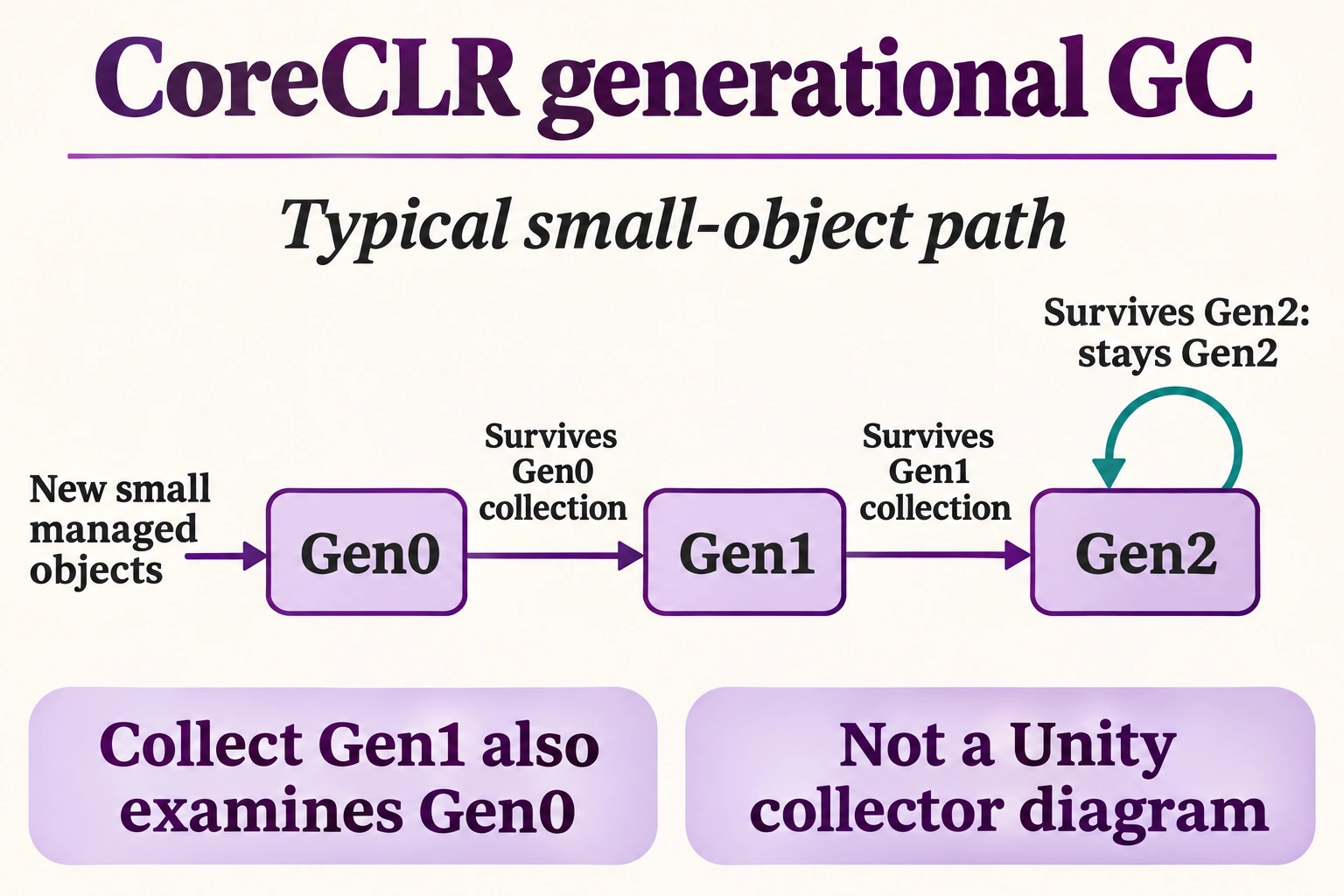
For ordinary small managed objects in CoreCLR, new allocations normally begin in generation zero. An object surviving a generation-zero collection can be promoted to generation one.
Surviving a generation-one collection can promote an object to generation two. An object already in generation two remains there when it survives another generation-two collection; there is no next ordinary age generation.
A generation-one collection includes generation zero. A generation-two collection includes the younger generations. The diagram is a conceptual typical path, not a promise that each individual object moves on every collection.
Large objects, explicitly pinned allocations and other special runtime paths need their own rules. This is a CoreCLR diagram, not Unity collector behavior or a guaranteed report from SharpRune WebAssembly.
Illustration created with ImageGen for SharpRune.
Trace the actual program
The program constructs a Payload and prints GC.MaxGeneration plus GC.GetGeneration for that object. It then keeps the object alive through the final call. The numeric observations intentionally have no fixed expected output: collector implementation, initialization activity, and execution history can affect what is reported. On a normal CoreCLR implementation the public maximum is two, but SharpRune's bundled browser runtime is a different target and must be observed independently. Neither printed number proves that this tiny program triggered promotion or identifies a physical heap segment.
How the mechanism works
For CoreCLR, collecting a generation includes younger generations, while full generation-two work also accounts for associated long-lived heap areas. Short-lived allocation and long-lived retention therefore create different pressure. Promotion is influenced by survival and implementation policy, including special cases such as pinned objects; it is not a source-code command issued by assigning a variable. Public GetGeneration should not be read as a universal physical-heap classifier. Large-object and pinned-object organization require their own qualified discussion rather than inventing public generation three as another value every caller can expect.
Boundaries and misconceptions
Do not run a forced-collection loop and assume its observed sequence is a portable promotion tutorial. Such experiments change the workload and can still depend on runtime details. In particular, Unity's documented collector is not the CoreCLR generational collector, and Mono/WebAssembly profiles have their own capabilities and behavior. An object staying reachable is also not the same as a memory leak: a useful cache may intentionally keep data alive. Investigate whether its lifetime matches the application contract before deciding that its generation is evidence of a defect.
Practice: change one ownership path
First add another ordinary Payload and print its observed generation under a separate label. Record the runtime and both observations, but do not assert that newly created objects must always produce an identical number in every environment. Hint: preserve strong references through KeepAlive if your experiment requires the objects to remain reachable. Change the payload's name and explain why its domain label has no direct relationship to generation; the collector does not classify objects by the text of their properties.
Practice: test a second boundary
Next replace one payload with a moderately sized byte array and compare the API observations without treating them as proof of SOH, LOH, or POH placement. Hint: a generation number and an allocation-region identity answer different questions, and this course's later heap lesson qualifies CoreCLR-specific thresholds. Repeat the same source on a documented desktop CoreCLR and in SharpRune, recording both profiles. Explain differences as target observations instead of presenting the desktop result as the expected browser output.
Review the evidence
The useful takeaway is a conditional mental model: CoreCLR generations reduce repeated examination of many longer-lived survivors, but source-level ownership still determines reachability. Record a target runtime before using its collector diagrams or counters. The sample provides bounded API observations and deliberately omits a deterministic numeric expectation. A correct review distinguishes public generation reporting, promotion policy, physical heap regions, and the separate managed runtime used by the app rather than collapsing all of them into one universal C# memory rule.
- Runtime-dependent generation observations deliberately have no fixed numeric expected output.
- CoreCLR public generations are not a universal model for every C# runtime.
- Promotion does not mean age in seconds, permanent liveness, or a physical heap identifier.
A working example
using System;
using System.Linq;
using System.Collections.Generic;
using System.Text;
using System.Buffers;
using System.Runtime.InteropServices;
using System.Runtime.CompilerServices;

var item = new Payload("rune");
Console.WriteLine($"max-generation:{GC.MaxGeneration}");
Console.WriteLine($"observed-generation:{GC.GetGeneration(item)}");
GC.KeepAlive(item);
record Payload(string Name);
Generation counts and allocation measurements can vary. Follow the lesson’s observation steps rather than matching a fixed transcript.
Runtime-dependent generation observations deliberately have no fixed numeric expected output.