A task describes an operation’s eventual outcome
GetCountAsync returns a Task<int>, not an integer that is immediately available to every caller. The task represents completion with an integer result or another terminal outcome such as failure or cancellation. Await connects the caller’s continuation to that outcome. Completion and result are the central ideas; the async keyword does not mean the entire method automatically runs on a background thread. This small example deliberately uses a timer rather than a network or filesystem dependency so the completion relationship can be explored inside the browser runtime.
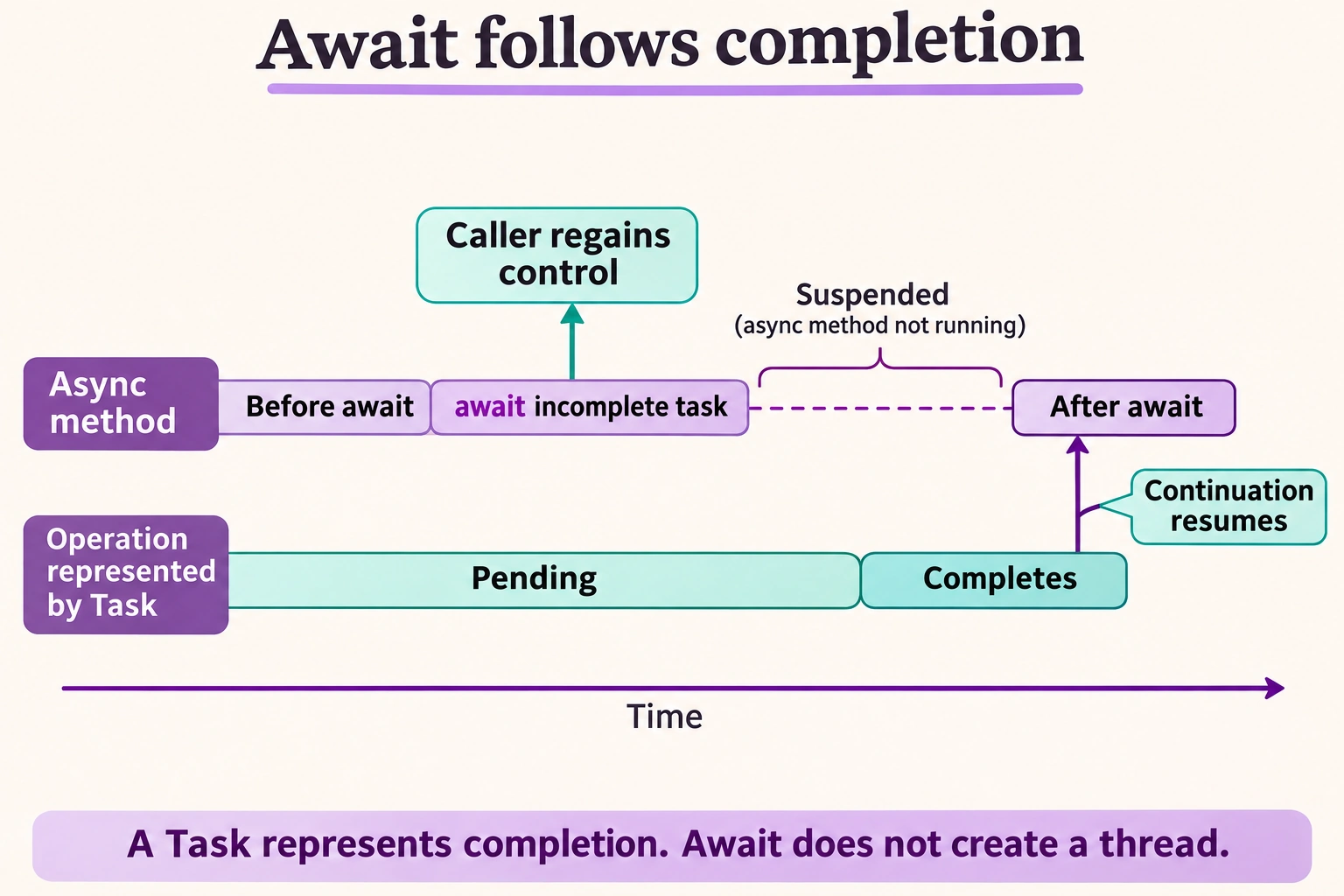 View full size ↗
Read the diagram
Call an async operation to obtain a task. The task represents its eventual completion; it is not itself a thread.
If the task is incomplete when awaited, the method suspends and returns control to its caller. The caller can await that method too. The executing thread is not blocked by this await.
When the operation completes, the method continues after await and observes the result or exception. If the task was already complete, await can continue synchronously.
Await does not automatically start a new thread, and an async method executes synchronously until it reaches an incomplete await. This is a control-flow diagram, not a promise about thread placement.
Illustration created with ImageGen for SharpRune.
The count is printed after its task completes
Calling GetCountAsync begins its method body. It awaits Task.Delay(1), then returns three. The top-level await does not assign count until that task completes successfully, and the following WriteLine prints 3. The one-millisecond argument is only a requested timer delay; the program does not measure or promise that total execution takes exactly one millisecond. The deterministic fact is the dependency: the returned count must be obtained before the line that prints it can continue.
var count = await GetCountAsync();Suspension is different from blocking
When an awaited operation is incomplete, an async method can suspend and allow its execution environment to do other work until continuation is possible. It does not need to synchronously block the caller’s thread waiting for the result. If an awaited task has already completed, continuation may happen without a suspension. These possibilities mean an await keyword is a completion boundary in the program’s logic, not a reliable marker for a new thread, a guaranteed scheduling turn, or a particular elapsed duration.
Starting work does not establish success
A method returning a task can finish its initial call before the represented operation reaches its terminal state. Ignoring that task loses the natural place to observe its result or failure. Accessing Result or calling Wait to force synchronous completion is not an equivalent design improvement; it can block a user-facing context and has different exception behavior. Keep the workflow asynchronous through its owner, await the task, and report success only after the owned operation has actually completed successfully.
Practice: make the caller’s order visible
Add a before message, store GetCountAsync’s task in a variable, print a started message, then await the stored task and print the count followed by an after message. Predict the caller’s explicit output order. Do not assert that an instantaneous IsCompleted observation must have one value, because timer scheduling can vary. Next change only the returned count to four and identify which output line changes. This isolates completion structure from the particular result carried by the task.
- Keep timing experiments separate from assertions about the order required by ordinary sequential statements.
- Use await on the stored task before treating its integer result as available.
Practice: observe a failed operation
For an independent experiment, throw a named InvalidOperationException after the delay instead of returning three, and handle it around the caller’s await. Predict that no successful count is printed on that path. Then restore the return and compare the caller’s success and failure messages. The task is the same kind of completion handle in both cases, but its terminal outcome changes. A robust owner must account for that outcome rather than assuming the async method name promises a value.
- Give the simulated failure a deliberate location so it is clear which operation the caller is observing.
- Avoid replacing an error with a valid-looking zero count unless that fallback is an explicit domain rule.
Explain dependencies before discussing scheduling
The useful explanation of this program names the task-producing method, the incomplete awaited operation, the eventual integer, and the caller’s observation point. It does not infer performance, thread count, or exact timer precision from the single printed count. These distinctions matter in SharpRune’s managed browser environment, where desktop thread-pool assumptions may not apply. As examples become larger, retain the same ownership question: which component starts the operation, keeps its task, awaits completion, and decides how the result, cancellation, or failure should be presented?
- Baseline output is one line containing
3. Task<int>represents eventual integer completion; await observes its result or terminal failure.- Async composition does not by itself guarantee parallel CPU execution or exact timing.
A working example
using System;
using System.Linq;
using System.Collections.Generic;
using System.Globalization;
using System.Text;
using System.Text.Json;
using System.Threading;
using System.Threading.Tasks;

var count = await GetCountAsync();
Console.WriteLine(count);
async Task<int> GetCountAsync()
{
    await Task.Delay(1);
    return 3;
}
Expected output
3
Await the task before using its result.